About FEMA
The official FEMA mobile app provides essential tools and information to help you prepare for, stay safe during, and recover from disasters. Empower yourself and your loved ones with critical resources at your fingertips....
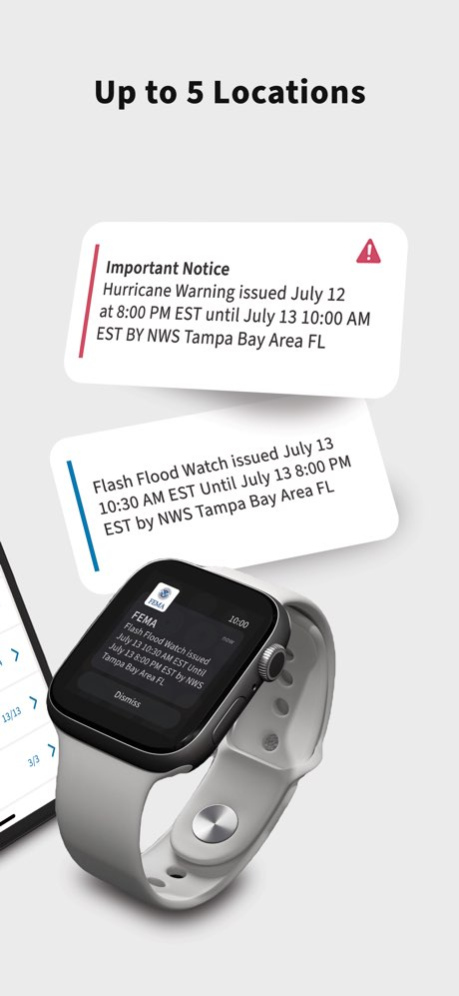
The official FEMA mobile app provides essential tools and information to help you prepare for, stay safe during, and recover from disasters. Empower yourself and your loved ones with critical resources at your fingertips. Key Features: - Timely and Relevant Alerts: Receive real-time weather and emergency alerts from the National Weather Service (NWS) and Integrated Public Alert and Warning System (IPAWS), tailored to your specified locations (up to five), utilizing zip code precision. Stay informed about potential hazards affecting the areas you care about. - Comprehensive Preparedness Guidance: Access clear, concise information on how to prepare for various disasters. Learn how to develop a family emergency communication plan and build an effective emergency kit. - Actionable Safety Advice: Understand immediate steps to take to protect yourself and your family during different types of emergencies. - Disaster Recovery Assistance: Find answers to frequently asked questions about the disaster assistance process and locate FEMA Disaster Recovery Centers nearby. - Accessibility Focused: Designed with accessibility in mind, the app is compatible with screen reader technology and adheres to federal accessibility standards. Be proactive in ensuing your safety and resilience. Download the official FEMA App today to access vital information and resources when you need them most. It’s a free and essential tool for every individual and family. If you have any questions, comments or ideas, we’d love to hear them. Contact us at fema-app@fema.dhs.gov. Important: Tornado alerts are a moving target using polygon tracking for accuracy. Real-time tornado alerts based on your current location are not currently offered in the FEMA app.
Version History - Improved app security through routine updates and security enhancements. - Updated location-based display in Targeted Messages. - Fixed minor UI/UX issues. 3.2.1 Aug 17 Introducing targeted messaging in the FEMA app. This new feature allows FEMA to send timely, localized updates and important information to users based on their main location, helping deliver more relevant communication during emergencies. For questions or comments, please reach out: fema-app@fema.dhs.gov 3.2 Jun 1 - Easier way to add locations. You can now search by City, State when adding a new location – in addition to using a zip code. This makes it simpler to find and follow the places that matter most to you. - We’ve made UI/UX improvements and updates to make the app easier to use and more reliable. 3.1.6 Mar 26 - We’ve created a more unified alert and location experience. You can now manage each saved location in one place – customize alert preferences or remove a location entirely. - Added a language disclaimer to the Spanish-language version of the app. - Made refinements to alert accuracy. - Misc. UI/UX improvements. 3.1.5 Jan 12 - Updated UI and UX for a smoother, more intuitive app experience. - Minor text updates throughout the app. - Added Prepare section: Recommended Content to alert details for quicker access to helpful resources. 3.1.2 09/11/2025 - Added a pop-up before directing users to non-FEMA URLs. - Added additional non-primary city names for certain locations. - Misc. bug fixes. 3.1.1 06/30/2025 - Get More Precise Alerts: We've implemented zip codes for your locations to deliver more accurate and relevant alerts while reducing duplicates. - Enjoy Easier Location Management: Onboarding, adding, and deleting locations is now more streamlined with our updated UI/UX. - Disaster Recovery Center (DRC) listings now display "Temporarily Closed" when applicable. - Added a new Disaster Distress Helpline page to provide resources for emotional well-being after disasters. - Alert detail pages now feature "Recommended Content" links (to Ready.gov) to help you make more informed decisions during emergencies. - Added a call-to-action for tribal users to provide valuable feedback on the app. - General Improvements including minor enhancements and fixes for various bugs. 3.1.0 04/30/2025 - Added four new alert types: Tornado Emergency, Tropical Cyclone Statement, Special Weather Statement, and Severe Weather Statement. - Misc. bug fixes. 3.0.16 11/20/2024 - Updated text format for weather and emergency alert descriptions. - Added Firebase analytics tracking to various areas of the app. - Misc. text updates and bug fixes. 3.0.15 08/26/2024 - Launched in-app customer satisfaction survey. - New Accessibility page in Settings. - Updates to static text. - Updates to Firebase analytics tracking. - Miscellaneous bug fixes. 3.0.14 06/13/2024 - Launched a new modal to announce product-related updates. - Introduced 19 new weather alert types from NWS. - Added dynamic text call-outs to main pages. - Added Firebase Analytics tracking code to Prepare. 3.0.13 02/15/2024 - Bug fix to silent notifications settings page and Prepare slideshow category title - Added Firebase tracking for iOS push notifications and Silent Notification options - Added disclaimer in the Alerts section about "duplicate" alerts 3.0.12 05/22/2023 - New Push Notifications setting to temporarily silence push notifications for alerts. Now you can choose to silence push notifications for 1 hour, 8 hours or 24 hours. During this time period you will still receive push notifications from us, but there will be no sound or vibration. - Updated VoiceOver controls on Alert Preferences. 3.0.11 01/30/2023 - Introduced new home screen graphics - Updated DRC/Shelter Nearby pages so the list matches the 200 mile search - Added device info to FEMA feedback emails - Added analytics tracking for screen reader usage - Fixed color to email icons for branding purposes - Bug fix to remove duplicate disaster cards for locations that begin with “Saint” - Bug fix to display message when there are no cards on the home screen - Bug fix in the Recover section FAQs 3.0.10 12/12/2022 - Updated DRC/Shelter lookups to make them faster and more efficient. - Updated title for lodging providers. - Updated DRC/Shelter nearby pages so the list by state matches the 200 mile search. - Added two new categories to app FAQs. 3.0.9 11/10/2022 - Improvements to DRC/Shelter lookup and card display.ug fixes 3.0.8 10/13/2022 - Added Shelter and DRC cards to the Home screen feed. - Personalized emergency shelter and DRC maps so you can see the closest facilities to you first. - Introduced DIY Home Projects to help you prepare your home for common hazards. - Bug fix to the major disaster declarations feed for Puerto Rico. 3.0.6 09/29/2022 - Updated major disaster declaration logic so disaster cards appear for designated counties. 3.0.5 09/01/2022 - Added copy & paste functionality to alerts. Click the Share button to see a link to copy the entirety of the alert (headline and details). iOS users can also long press to copy alert details. - Bug fixes to Facebook share. You can now share the entirety of an alert (headline and details) to Facebook. - Added a pop-up notification for expired alerts. 3.0.4 08/18/2022 - Security updates. - Bug fixes to the app icon badge count. - Addition of DRC hours of operation. 3.0.3 08/05/2022 - Easy Navigation. All the core elements of the FEMA app experience are now in one consistent navigation menu, making the app simpler to explore. - Alerts Feed. Select your ZIP code to get nearby weather and emergency alerts in real-time. - Recovery FAQs. Explore a library of post-disaster frequently asked questions to get the information you want when you need it most. - Emergency Shelter and Disaster Recovery Center (DRC) Search. An enhanced look and feel makes finding nearby shelters and DRCs easier. - Preparedness 101. Learn how to prepare for disasters with engaging slideshows. If you have any questions, comments or ideas, we’d love to hear them. Contact us at fema-app@fema.dhs.gov. 3.0.2 07/05/2022 • Easy Navigation. All the core elements of the FEMA app experience are now in one consistent navigation menu, making the app simpler to explore. • Alerts Feed. Select your ZIP code to get nearby weather and emergency alerts in real-time. • Recovery FAQs. Explore a library of post-disaster frequently asked questions to get the information you want when you need it most. • Emergency Shelter and Disaster Recovery Center (DRC) Search. An enhanced look and feel makes finding nearby shelters and DRCs easier. • Preparedness 101. Learn how to prepare for disasters with engaging slideshows. 3.0 06/28/2022 Updated Contact Us information and Terms of Use 2.12.1 10/04/2021 - Improved alert customization UI. Easily choose alert notifications that you’d like to receive with ON/OFF toggles. - Refined and recategorized alert types. - Added error message dialogue boxes when app feeds are down. - Bug fixes. 2.12 06/28/2021 - Updates for iOS 14 compatibility 2.11.3 10/30/2020
Previous Versions
Here you can find the changelog of FEMA since it was posted on our website on 2016-09-27 11:36:44.
The latest version is 3.2.1 and it was updated on 2026-10-12 19:51:13. See below the changes in each version.
FEMA version 3.2.1
Updated At: 2026-10-08
Changes: Version History - Improved app security through routine updates and security enhancements.
- Updated location-based display in Targeted Messages.
- Fixed minor UI/UX issues. 3.2.1 Aug 17 Introducing targeted messaging in the FEMA app. This new feature allows FEMA to send timely, localized updates and important information to users based on their main location, helping deliver more relevant communication during emergencies.
For questions or comments, please reach out: fema-app@fema.dhs.gov 3.2 Jun 1 - Easier way to add locations. You can now search by City, State when adding a new location – in addition to using a zip code. This makes it simpler to find and follow the places that matter most to you.
- We’ve made UI/UX improvements and updates to make the app easier to use and more reliable. 3.1.6 Mar 26 - We’ve created a more unified alert and location experience. You can now manage each saved location in one place – customize alert preferences or remove a location entirely.
- Added a language disclaimer to the Spanish-language version of the app.
- Made refinements to alert accuracy.
- Misc. UI/UX improvements. 3.1.5 Jan 12 - Updated UI and UX for a smoother, more intuitive app experience.
- Minor text updates throughout the app.
- Added Prepare section: Recommended Content to alert details for quicker access to helpful resources. 3.1.2 09/11/2025 - Added a pop-up before directing users to non-FEMA URLs.
- Added additional non-primary city names for certain locations.
- Misc. bug fixes. 3.1.1 06/30/2025 - Get More Precise Alerts: We've implemented zip codes for your locations to deliver more accurate and relevant alerts while reducing duplicates.
- Enjoy Easier Location Management: Onboarding, adding, and deleting locations is now more streamlined with our updated UI/UX.
- Disaster Recovery Center (DRC) listings now display "Temporarily Closed" when applicable.
- Added a new Disaster Distress Helpline page to provide resources for emotional well-being after disasters.
- Alert detail pages now feature "Recommended Content" links (to Ready.gov) to help you make more informed decisions during emergencies.
- Added a call-to-action for tribal users to provide valuable feedback on the app.
- General Improvements including minor enhancements and fixes for various bugs. 3.1.0 04/30/2025 - Added four new alert types: Tornado Emergency, Tropical Cyclone Statement, Special Weather Statement, and Severe Weather Statement.
- Misc. bug fixes. 3.0.16 11/20/2024 - Updated text format for weather and emergency alert descriptions.
- Added Firebase analytics tracking to various areas of the app.
- Misc. text updates and bug fixes. 3.0.15 08/26/2024 - Launched in-app customer satisfaction survey.
- New Accessibility page in Settings.
- Updates to static text.
- Updates to Firebase analytics tracking.
- Miscellaneous bug fixes. 3.0.14 06/13/2024 - Launched a new modal to announce product-related updates.
- Introduced 19 new weather alert types from NWS.
- Added dynamic text call-outs to main pages.
- Added Firebase Analytics tracking code to Prepare. 3.0.13 02/15/2024 - Bug fix to silent notifications settings page and Prepare slideshow category title
- Added Firebase tracking for iOS push notifications and Silent Notification options
- Added disclaimer in the Alerts section about "duplicate" alerts 3.0.12 05/22/2023 - New Push Notifications setting to temporarily silence push notifications for alerts. Now you can choose to silence push notifications for 1 hour, 8 hours or 24 hours. During this time period you will still receive push notifications from us, but there will be no sound or vibration.
- Updated VoiceOver controls on Alert Preferences. 3.0.11 01/30/2023 - Introduced new home screen graphics
- Updated DRC/Shelter Nearby pages so the list matches the 200 mile search
- Added device info to FEMA feedback emails
- Added analytics tracking for screen reader usage
- Fixed color to email icons for branding purposes
- Bug fix to remove duplicate disaster cards for locations that begin with “Saint”
- Bug fix to display message when there are no cards on the home screen
- Bug fix in the Recover section FAQs 3.0.10 12/12/2022 - Updated DRC/Shelter lookups to make them faster and more efficient.
- Updated title for lodging providers.
- Updated DRC/Shelter nearby pages so the list by state matches the 200 mile search.
- Added two new categories to app FAQs. 3.0.9 11/10/2022 - Improvements to DRC/Shelter lookup and card display.ug fixes 3.0.8 10/13/2022 - Added Shelter and DRC cards to the Home screen feed.
- Personalized emergency shelter and DRC maps so you can see the closest facilities to you first.
- Introduced DIY Home Projects to help you prepare your home for common hazards.
- Bug fix to the major disaster declarations feed for Puerto Rico. 3.0.6 09/29/2022 - Updated major disaster declaration logic so disaster cards appear for designated counties. 3.0.5 09/01/2022 - Added copy & paste functionality to alerts. Click the Share button to see a link to copy the entirety of the alert (headline and details). iOS users can also long press to copy alert details.
- Bug fixes to Facebook share. You can now share the entirety of an alert (headline and details) to Facebook.
- Added a pop-up notification for expired alerts. 3.0.4 08/18/2022 - Security updates.
- Bug fixes to the app icon badge count.
- Addition of DRC hours of operation. 3.0.3 08/05/2022 - Easy Navigation. All the core elements of the FEMA app experience are now in one consistent navigation menu, making the app simpler to explore.
- Alerts Feed. Select your ZIP code to get nearby weather and emergency alerts in real-time.
- Recovery FAQs. Explore a library of post-disaster frequently asked questions to get the information you want when you need it most.
- Emergency Shelter and Disaster Recovery Center (DRC) Search. An enhanced look and feel makes finding nearby shelters and DRCs easier.
- Preparedness 101. Learn how to prepare for disasters with engaging slideshows.
If you have any questions, comments or ideas, we’d love to hear them. Contact us at fema-app@fema.dhs.gov. 3.0.2 07/05/2022 • Easy Navigation. All the core elements of the FEMA app experience are now in one consistent navigation menu, making the app simpler to explore.
• Alerts Feed. Select your ZIP code to get nearby weather and emergency alerts in real-time.
• Recovery FAQs. Explore a library of post-disaster frequently asked questions to get the information you want when you need it most.
• Emergency Shelter and Disaster Recovery Center (DRC) Search. An enhanced look and feel makes finding nearby shelters and DRCs easier.
• Preparedness 101. Learn how to prepare for disasters with engaging slideshows. 3.0 06/28/2022 Updated Contact Us information and Terms of Use 2.12.1 10/04/2021 - Improved alert customization UI. Easily choose alert notifications that you’d like to receive with ON/OFF toggles.
- Refined and recategorized alert types.
- Added error message dialogue boxes when app feeds are down.
- Bug fixes. 2.12 06/28/2021 - Updates for iOS 14 compatibility 2.11.3 10/30/2020
FEMA version 3.2.1
Updated At: 2026-08-21
Changes: Version History - Improved app security through routine updates and security enhancements.
- Updated location-based display in Targeted Messages.
- Fixed minor UI/UX issues. 3.2.1 4d ago Introducing targeted messaging in the FEMA app. This new feature allows FEMA to send timely, localized updates and important information to users based on their main location, helping deliver more relevant communication during emergencies.
For questions or comments, please reach out: fema-app@fema.dhs.gov 3.2 Jun 1 - Easier way to add locations. You can now search by City, State when adding a new location – in addition to using a zip code. This makes it simpler to find and follow the places that matter most to you.
- We’ve made UI/UX improvements and updates to make the app easier to use and more reliable. 3.1.6 Mar 26 - We’ve created a more unified alert and location experience. You can now manage each saved location in one place – customize alert preferences or remove a location entirely.
- Added a language disclaimer to the Spanish-language version of the app.
- Made refinements to alert accuracy.
- Misc. UI/UX improvements. 3.1.5 Jan 12 - Updated UI and UX for a smoother, more intuitive app experience.
- Minor text updates throughout the app.
- Added Prepare section: Recommended Content to alert details for quicker access to helpful resources. 3.1.2 09/11/2025 - Added a pop-up before directing users to non-FEMA URLs.
- Added additional non-primary city names for certain locations.
- Misc. bug fixes. 3.1.1 06/30/2025 - Get More Precise Alerts: We've implemented zip codes for your locations to deliver more accurate and relevant alerts while reducing duplicates.
- Enjoy Easier Location Management: Onboarding, adding, and deleting locations is now more streamlined with our updated UI/UX.
- Disaster Recovery Center (DRC) listings now display "Temporarily Closed" when applicable.
- Added a new Disaster Distress Helpline page to provide resources for emotional well-being after disasters.
- Alert detail pages now feature "Recommended Content" links (to Ready.gov) to help you make more informed decisions during emergencies.
- Added a call-to-action for tribal users to provide valuable feedback on the app.
- General Improvements including minor enhancements and fixes for various bugs. 3.1.0 04/30/2025 - Added four new alert types: Tornado Emergency, Tropical Cyclone Statement, Special Weather Statement, and Severe Weather Statement.
- Misc. bug fixes. 3.0.16 11/20/2024 - Updated text format for weather and emergency alert descriptions.
- Added Firebase analytics tracking to various areas of the app.
- Misc. text updates and bug fixes. 3.0.15 08/26/2024 - Launched in-app customer satisfaction survey.
- New Accessibility page in Settings.
- Updates to static text.
- Updates to Firebase analytics tracking.
- Miscellaneous bug fixes. 3.0.14 06/13/2024 - Launched a new modal to announce product-related updates.
- Introduced 19 new weather alert types from NWS.
- Added dynamic text call-outs to main pages.
- Added Firebase Analytics tracking code to Prepare. 3.0.13 02/15/2024 - Bug fix to silent notifications settings page and Prepare slideshow category title
- Added Firebase tracking for iOS push notifications and Silent Notification options
- Added disclaimer in the Alerts section about "duplicate" alerts 3.0.12 05/22/2023 - New Push Notifications setting to temporarily silence push notifications for alerts. Now you can choose to silence push notifications for 1 hour, 8 hours or 24 hours. During this time period you will still receive push notifications from us, but there will be no sound or vibration.
- Updated VoiceOver controls on Alert Preferences. 3.0.11 01/30/2023 - Introduced new home screen graphics
- Updated DRC/Shelter Nearby pages so the list matches the 200 mile search
- Added device info to FEMA feedback emails
- Added analytics tracking for screen reader usage
- Fixed color to email icons for branding purposes
- Bug fix to remove duplicate disaster cards for locations that begin with “Saint”
- Bug fix to display message when there are no cards on the home screen
- Bug fix in the Recover section FAQs 3.0.10 12/12/2022 - Updated DRC/Shelter lookups to make them faster and more efficient.
- Updated title for lodging providers.
- Updated DRC/Shelter nearby pages so the list by state matches the 200 mile search.
- Added two new categories to app FAQs. 3.0.9 11/10/2022 - Improvements to DRC/Shelter lookup and card display.ug fixes 3.0.8 10/13/2022 - Added Shelter and DRC cards to the Home screen feed.
- Personalized emergency shelter and DRC maps so you can see the closest facilities to you first.
- Introduced DIY Home Projects to help you prepare your home for common hazards.
- Bug fix to the major disaster declarations feed for Puerto Rico. 3.0.6 09/29/2022 - Updated major disaster declaration logic so disaster cards appear for designated counties. 3.0.5 09/01/2022 - Added copy & paste functionality to alerts. Click the Share button to see a link to copy the entirety of the alert (headline and details). iOS users can also long press to copy alert details.
- Bug fixes to Facebook share. You can now share the entirety of an alert (headline and details) to Facebook.
- Added a pop-up notification for expired alerts. 3.0.4 08/18/2022 - Security updates.
- Bug fixes to the app icon badge count.
- Addition of DRC hours of operation. 3.0.3 08/05/2022 - Easy Navigation. All the core elements of the FEMA app experience are now in one consistent navigation menu, making the app simpler to explore.
- Alerts Feed. Select your ZIP code to get nearby weather and emergency alerts in real-time.
- Recovery FAQs. Explore a library of post-disaster frequently asked questions to get the information you want when you need it most.
- Emergency Shelter and Disaster Recovery Center (DRC) Search. An enhanced look and feel makes finding nearby shelters and DRCs easier.
- Preparedness 101. Learn how to prepare for disasters with engaging slideshows.
If you have any questions, comments or ideas, we’d love to hear them. Contact us at fema-app@fema.dhs.gov. 3.0.2 07/05/2022 • Easy Navigation. All the core elements of the FEMA app experience are now in one consistent navigation menu, making the app simpler to explore.
• Alerts Feed. Select your ZIP code to get nearby weather and emergency alerts in real-time.
• Recovery FAQs. Explore a library of post-disaster frequently asked questions to get the information you want when you need it most.
• Emergency Shelter and Disaster Recovery Center (DRC) Search. An enhanced look and feel makes finding nearby shelters and DRCs easier.
• Preparedness 101. Learn how to prepare for disasters with engaging slideshows. 3.0 06/28/2022 Updated Contact Us information and Terms of Use 2.12.1 10/04/2021 - Improved alert customization UI. Easily choose alert notifications that you’d like to receive with ON/OFF toggles.
- Refined and recategorized alert types.
- Added error message dialogue boxes when app feeds are down.
- Bug fixes. 2.12 06/28/2021 - Updates for iOS 14 compatibility 2.11.3 10/30/2020
FEMA version 3.2
Updated At: 2026-07-24
Changes: Version History Introducing targeted messaging in the FEMA app. This new feature allows FEMA to send timely, localized updates and important information to users based on their main location, helping deliver more relevant communication during emergencies.
For questions or comments, please reach out: fema-app@fema.dhs.gov 3.2 Jun 1 - Easier way to add locations. You can now search by City, State when adding a new location – in addition to using a zip code. This makes it simpler to find and follow the places that matter most to you.
- We’ve made UI/UX improvements and updates to make the app easier to use and more reliable. 3.1.6 Mar 26 - We’ve created a more unified alert and location experience. You can now manage each saved location in one place – customize alert preferences or remove a location entirely.
- Added a language disclaimer to the Spanish-language version of the app.
- Made refinements to alert accuracy.
- Misc. UI/UX improvements. 3.1.5 Jan 12 - Updated UI and UX for a smoother, more intuitive app experience.
- Minor text updates throughout the app.
- Added Prepare section: Recommended Content to alert details for quicker access to helpful resources. 3.1.2 09/11/2025 - Added a pop-up before directing users to non-FEMA URLs.
- Added additional non-primary city names for certain locations.
- Misc. bug fixes. 3.1.1 06/30/2025 - Get More Precise Alerts: We've implemented zip codes for your locations to deliver more accurate and relevant alerts while reducing duplicates.
- Enjoy Easier Location Management: Onboarding, adding, and deleting locations is now more streamlined with our updated UI/UX.
- Disaster Recovery Center (DRC) listings now display "Temporarily Closed" when applicable.
- Added a new Disaster Distress Helpline page to provide resources for emotional well-being after disasters.
- Alert detail pages now feature "Recommended Content" links (to Ready.gov) to help you make more informed decisions during emergencies.
- Added a call-to-action for tribal users to provide valuable feedback on the app.
- General Improvements including minor enhancements and fixes for various bugs. 3.1.0 04/30/2025 - Added four new alert types: Tornado Emergency, Tropical Cyclone Statement, Special Weather Statement, and Severe Weather Statement.
- Misc. bug fixes. 3.0.16 11/20/2024 - Updated text format for weather and emergency alert descriptions.
- Added Firebase analytics tracking to various areas of the app.
- Misc. text updates and bug fixes. 3.0.15 08/26/2024 - Launched in-app customer satisfaction survey.
- New Accessibility page in Settings.
- Updates to static text.
- Updates to Firebase analytics tracking.
- Miscellaneous bug fixes. 3.0.14 06/13/2024 - Launched a new modal to announce product-related updates.
- Introduced 19 new weather alert types from NWS.
- Added dynamic text call-outs to main pages.
- Added Firebase Analytics tracking code to Prepare. 3.0.13 02/15/2024 - Bug fix to silent notifications settings page and Prepare slideshow category title
- Added Firebase tracking for iOS push notifications and Silent Notification options
- Added disclaimer in the Alerts section about "duplicate" alerts 3.0.12 05/22/2023 - New Push Notifications setting to temporarily silence push notifications for alerts. Now you can choose to silence push notifications for 1 hour, 8 hours or 24 hours. During this time period you will still receive push notifications from us, but there will be no sound or vibration.
- Updated VoiceOver controls on Alert Preferences. 3.0.11 01/30/2023 - Introduced new home screen graphics
- Updated DRC/Shelter Nearby pages so the list matches the 200 mile search
- Added device info to FEMA feedback emails
- Added analytics tracking for screen reader usage
- Fixed color to email icons for branding purposes
- Bug fix to remove duplicate disaster cards for locations that begin with “Saint”
- Bug fix to display message when there are no cards on the home screen
- Bug fix in the Recover section FAQs 3.0.10 12/12/2022 - Updated DRC/Shelter lookups to make them faster and more efficient.
- Updated title for lodging providers.
- Updated DRC/Shelter nearby pages so the list by state matches the 200 mile search.
- Added two new categories to app FAQs. 3.0.9 11/10/2022 - Improvements to DRC/Shelter lookup and card display.ug fixes 3.0.8 10/13/2022 - Added Shelter and DRC cards to the Home screen feed.
- Personalized emergency shelter and DRC maps so you can see the closest facilities to you first.
- Introduced DIY Home Projects to help you prepare your home for common hazards.
- Bug fix to the major disaster declarations feed for Puerto Rico. 3.0.6 09/29/2022 - Updated major disaster declaration logic so disaster cards appear for designated counties. 3.0.5 09/01/2022 - Added copy & paste functionality to alerts. Click the Share button to see a link to copy the entirety of the alert (headline and details). iOS users can also long press to copy alert details.
- Bug fixes to Facebook share. You can now share the entirety of an alert (headline and details) to Facebook.
- Added a pop-up notification for expired alerts. 3.0.4 08/18/2022 - Security updates.
- Bug fixes to the app icon badge count.
- Addition of DRC hours of operation. 3.0.3 08/05/2022 - Easy Navigation. All the core elements of the FEMA app experience are now in one consistent navigation menu, making the app simpler to explore.
- Alerts Feed. Select your ZIP code to get nearby weather and emergency alerts in real-time.
- Recovery FAQs. Explore a library of post-disaster frequently asked questions to get the information you want when you need it most.
- Emergency Shelter and Disaster Recovery Center (DRC) Search. An enhanced look and feel makes finding nearby shelters and DRCs easier.
- Preparedness 101. Learn how to prepare for disasters with engaging slideshows.
If you have any questions, comments or ideas, we’d love to hear them. Contact us at fema-app@fema.dhs.gov. 3.0.2 07/05/2022 • Easy Navigation. All the core elements of the FEMA app experience are now in one consistent navigation menu, making the app simpler to explore.
• Alerts Feed. Select your ZIP code to get nearby weather and emergency alerts in real-time.
• Recovery FAQs. Explore a library of post-disaster frequently asked questions to get the information you want when you need it most.
• Emergency Shelter and Disaster Recovery Center (DRC) Search. An enhanced look and feel makes finding nearby shelters and DRCs easier.
• Preparedness 101. Learn how to prepare for disasters with engaging slideshows. 3.0 06/28/2022 Updated Contact Us information and Terms of Use 2.12.1 10/04/2021 - Improved alert customization UI. Easily choose alert notifications that you’d like to receive with ON/OFF toggles.
- Refined and recategorized alert types.
- Added error message dialogue boxes when app feeds are down.
- Bug fixes. 2.12 06/28/2021 - Updates for iOS 14 compatibility 2.11.3 10/30/2020 - Styling updated for iPhone X 2.11.2 10/27/2020
FEMA version 3.1.6
Updated At: 2026-05-30
Changes: Version History - Easier way to add locations. You can now search by City, State when adding a new location – in addition to using a zip code. This makes it simpler to find and follow the places that matter most to you.
- We’ve made UI/UX improvements and updates to make the app easier to use and more reliable. 3.1.6 Mar 26 - We’ve created a more unified alert and location experience. You can now manage each saved location in one place – customize alert preferences or remove a location entirely.
- Added a language disclaimer to the Spanish-language version of the app.
- Made refinements to alert accuracy.
- Misc. UI/UX improvements. 3.1.5 Jan 12 - Updated UI and UX for a smoother, more intuitive app experience.
- Minor text updates throughout the app.
- Added Prepare section: Recommended Content to alert details for quicker access to helpful resources. 3.1.2 09/11/2025 - Added a pop-up before directing users to non-FEMA URLs.
- Added additional non-primary city names for certain locations.
- Misc. bug fixes. 3.1.1 06/30/2025 - Get More Precise Alerts: We've implemented zip codes for your locations to deliver more accurate and relevant alerts while reducing duplicates.
- Enjoy Easier Location Management: Onboarding, adding, and deleting locations is now more streamlined with our updated UI/UX.
- Disaster Recovery Center (DRC) listings now display "Temporarily Closed" when applicable.
- Added a new Disaster Distress Helpline page to provide resources for emotional well-being after disasters.
- Alert detail pages now feature "Recommended Content" links (to Ready.gov) to help you make more informed decisions during emergencies.
- Added a call-to-action for tribal users to provide valuable feedback on the app.
- General Improvements including minor enhancements and fixes for various bugs. 3.1.0 04/30/2025 - Added four new alert types: Tornado Emergency, Tropical Cyclone Statement, Special Weather Statement, and Severe Weather Statement.
- Misc. bug fixes. 3.0.16 11/20/2024 - Updated text format for weather and emergency alert descriptions.
- Added Firebase analytics tracking to various areas of the app.
- Misc. text updates and bug fixes. 3.0.15 08/26/2024 - Launched in-app customer satisfaction survey.
- New Accessibility page in Settings.
- Updates to static text.
- Updates to Firebase analytics tracking.
- Miscellaneous bug fixes. 3.0.14 06/13/2024 - Launched a new modal to announce product-related updates.
- Introduced 19 new weather alert types from NWS.
- Added dynamic text call-outs to main pages.
- Added Firebase Analytics tracking code to Prepare. 3.0.13 02/15/2024 - Bug fix to silent notifications settings page and Prepare slideshow category title
- Added Firebase tracking for iOS push notifications and Silent Notification options
- Added disclaimer in the Alerts section about "duplicate" alerts 3.0.12 05/22/2023 - New Push Notifications setting to temporarily silence push notifications for alerts. Now you can choose to silence push notifications for 1 hour, 8 hours or 24 hours. During this time period you will still receive push notifications from us, but there will be no sound or vibration.
- Updated VoiceOver controls on Alert Preferences. 3.0.11 01/30/2023 - Introduced new home screen graphics
- Updated DRC/Shelter Nearby pages so the list matches the 200 mile search
- Added device info to FEMA feedback emails
- Added analytics tracking for screen reader usage
- Fixed color to email icons for branding purposes
- Bug fix to remove duplicate disaster cards for locations that begin with “Saint”
- Bug fix to display message when there are no cards on the home screen
- Bug fix in the Recover section FAQs 3.0.10 12/12/2022 - Updated DRC/Shelter lookups to make them faster and more efficient.
- Updated title for lodging providers.
- Updated DRC/Shelter nearby pages so the list by state matches the 200 mile search.
- Added two new categories to app FAQs. 3.0.9 11/10/2022 - Improvements to DRC/Shelter lookup and card display.ug fixes 3.0.8 10/13/2022 - Added Shelter and DRC cards to the Home screen feed.
- Personalized emergency shelter and DRC maps so you can see the closest facilities to you first.
- Introduced DIY Home Projects to help you prepare your home for common hazards.
- Bug fix to the major disaster declarations feed for Puerto Rico. 3.0.6 09/29/2022 - Updated major disaster declaration logic so disaster cards appear for designated counties. 3.0.5 09/01/2022 - Added copy & paste functionality to alerts. Click the Share button to see a link to copy the entirety of the alert (headline and details). iOS users can also long press to copy alert details.
- Bug fixes to Facebook share. You can now share the entirety of an alert (headline and details) to Facebook.
- Added a pop-up notification for expired alerts. 3.0.4 08/18/2022 - Security updates.
- Bug fixes to the app icon badge count.
- Addition of DRC hours of operation. 3.0.3 08/05/2022 - Easy Navigation. All the core elements of the FEMA app experience are now in one consistent navigation menu, making the app simpler to explore.
- Alerts Feed. Select your ZIP code to get nearby weather and emergency alerts in real-time.
- Recovery FAQs. Explore a library of post-disaster frequently asked questions to get the information you want when you need it most.
- Emergency Shelter and Disaster Recovery Center (DRC) Search. An enhanced look and feel makes finding nearby shelters and DRCs easier.
- Preparedness 101. Learn how to prepare for disasters with engaging slideshows.
If you have any questions, comments or ideas, we’d love to hear them. Contact us at fema-app@fema.dhs.gov. 3.0.2 07/05/2022 • Easy Navigation. All the core elements of the FEMA app experience are now in one consistent navigation menu, making the app simpler to explore.
• Alerts Feed. Select your ZIP code to get nearby weather and emergency alerts in real-time.
• Recovery FAQs. Explore a library of post-disaster frequently asked questions to get the information you want when you need it most.
• Emergency Shelter and Disaster Recovery Center (DRC) Search. An enhanced look and feel makes finding nearby shelters and DRCs easier.
• Preparedness 101. Learn how to prepare for disasters with engaging slideshows. 3.0 06/28/2022 Updated Contact Us information and Terms of Use 2.12.1 10/04/2021 - Improved alert customization UI. Easily choose alert notifications that you’d like to receive with ON/OFF toggles.
- Refined and recategorized alert types.
- Added error message dialogue boxes when app feeds are down.
- Bug fixes. 2.12 06/28/2021 - Updates for iOS 14 compatibility 2.11.3 10/30/2020 - Styling updated for iPhone X 2.11.2 10/27/2020 - Added featured content section to home page for important information
- Updated Mitigate Your Risk section with additional Do-It-Yourself categories
- Section 508 Accessibility fixes
- Updated mobile theme 2.11.1 07/09/2020
FEMA version 3.1.5
Updated At: 2026-01-12
Changes: - We’ve created a more unified alert and location experience. You can now manage each saved location in one place – customize alert preferences or remove a location entirely.
- Added a language disclaimer to the Spanish-language version of the app.
- Made refinements to alert accuracy.
- Misc. UI/UX improvements.
FEMA version 3.1.2
Updated At: 2025-09-11
Changes: Sep 11, 2025
Version 3.1.2
- Updated UI and UX for a smoother, more intuitive app experience.
- Minor text updates throughout the app.
- Added Prepare section: Recommended Content to alert details for quicker access to helpful resources.
FEMA version 3.1.1
Updated At: 2025-06-30
Changes: Jun 30, 2025
Version 3.1.1
- Added a pop-up before directing users to non-FEMA URLs.
- Added additional non-primary city names for certain locations.
- Misc. bug fixes.
FEMA version 3.1.0
Updated At: 2025-04-30
Changes: Apr 30, 2025
Version 3.1.0
- Get More Precise Alerts: We've implemented zip codes for your locations to deliver more accurate and relevant alerts while reducing duplicates.
- Enjoy Easier Location Management: Onboarding, adding, and deleting locations is now more streamlined with our updated UI/UX.
- Disaster Recovery Center (DRC) listings now display "Temporarily Closed" when applicable.
- Added a new Disaster Distress Helpline page to provide resources for emotional well-being after disasters.
- Alert detail pages now feature "Recommended Content" links (to Ready.gov) to help you make more informed decisions during emergencies.
- Added a call-to-action for tribal users to provide valuable feedback on the app.
- General Improvements including minor enhancements and fixes for various bugs.
FEMA version 3.0.16
Updated At: 2024-11-20
Changes: Nov 20, 2024
Version 3.0.16
- Added four new alert types: Tornado Emergency, Tropical Cyclone Statement, Special Weather Statement, and Severe Weather Statement.
- Misc. bug fixes.
FEMA version 3.0.15
Updated At: 2024-08-26
Changes: Aug 26, 2024
Version 3.0.15
- Updated text format for weather and emergency alert descriptions.
- Added Firebase analytics tracking to various areas of the app.
- Misc. text updates and bug fixes.
Disclaimer
Official App Store Link
We do not host FEMA on our servers. We did not scan it for viruses, adware, spyware or other type of malware. This app is hosted by Apple and passed their terms and conditions to be listed there. We recommend caution when installing it.
The App Store link for FEMA is provided to you by apps112.com without any warranties, representations or guarantees of any kind, so access it at your own risk.
If you have questions regarding this particular app contact the publisher directly. For questions about the functionalities of apps112.com contact us.